
Circuit simulation · Pro
Perfboard simulator
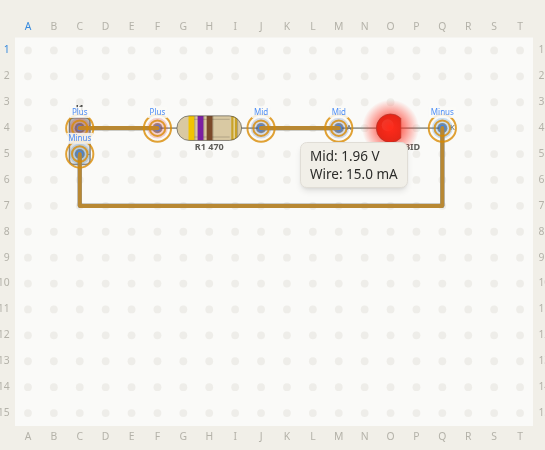
Press Simulate on a PerfBoard board and the circuit you wired runs. LEDs light up and show their current. Hover a wire to read its voltage and current. If a part is pushed past its limits, the Problems list says which one and why. You see it on your own board, before you solder.
What it simulates
Parts come from the component library. A part with a model is marked Simulates there. Today that covers:
- Resistors and capacitors. Set by value. Ceramic and electrolytic capacitors both work.
- LEDs. 3 mm and 5 mm LEDs from Kingbright and Vishay, RGB and infrared included.
- Diodes. Rectifier, signal, Schottky and zener diodes, such as the 1N4007, 1N4148, 1N5819 and 1N4733A.
- Transistors. Bipolar transistors such as the 2N3904, BC547 and TIP120, and MOSFETs such as the 2N7000 and IRLZ44N.
- Voltage regulators. Linear regulators such as the LM7805, LM78L05 and MCP1700.
- 555 timers. The TI NE555, LM555 and CMOS TLC555, for blinkers and one-shot timers.
- Op-amps. The TI LM358, LM324 and TL072 and the Microchip MCP6002, with their gain, bandwidth and output swing.
- Comparators. The TI LM393 and LM339. Their open-collector outputs need a pull-up resistor.
- Logic gates. TI 74HC and CD4000 chips such as the SN74HC08, SN74HC86 and CD4011B: AND, OR, XOR, NAND, NOR and inverters, Schmitt-trigger ones included.
- Buttons, switches and pots. The Omron B3F-1000 push button, a C&K slide switch and the Bourns PTV09A pot.
- Dev boards. Arduino Nano, Seeed Studio XIAO ESP32C3, LOLIN D1 mini and Espressif ESP32 DevKits. They power the circuit, and you set each pin by hand: Off, Low, High or PWM.
- Power. A two-pin power input with presets such as a 9 V battery, 4 x AA, USB 5 V and a 12 V adapter.
Verify pin functions against the datasheet before wiring.
What it does not simulate
- Firmware. A dev board does not run your code. You set its pins by hand.
- AC sources such as mains or a signal generator.
- A part from its shape alone. A part needs a model from the library, or a value for a resistor or capacitor. Anything else stops the run and says why, and you can park it off the board to simulate the rest.
How a run works
- Add a power input and choose its supply in Properties, or wire in a dev board.
- Place parts from the library. A resistor or capacitor only needs its value.
- Wire the circuit and press Simulate.
- Hover a hole, a wire or a part to read it. Press a button, flip a switch or turn a pot, and the readings follow.
- If something stops the run, the Problems list names the part and what to change.

The docs walk through each step.
Questions
- Is the circuit simulator free?
- Simulating needs PerfBoard Pro, monthly or yearly. Designing the board, choosing parts and setting their values work on the free plan for 30 days. Compare plans at /pricing. See plans
- Does a simulation prove my circuit works?
- No. It runs a model of the circuit you drew. It cannot check that your real part's pins match its footprint. Verify pin functions against the datasheet before wiring.
- Which parts can I simulate?
- Parts in the component library that carry a model, marked "Simulates" at /library, plus any resistor or capacitor set by its value. A part with no model stops the run and the Problems list names it. Browse the library
- Does it work on a stripboard?
- Yes. On a stripboard the copper strips carry current the same way wires and solder bridges do, and a track cut opens the strip.
- Does it run my firmware?
- No. You set each dev board pin by hand: Off, Low, High or PWM.
- Can my AI agent run a simulation?
- Yes. A connected MCP client can run the same simulation on a saved board with the perfboard_simulate_board tool. Agent access needs Pro with the AI agents add-on. See /ai-agents. AI agents